OBD2 Bluetooth Scan Gauge
Wireless diagnostics for Android
Plug this compact OBD2 Bluetooth module into your vehicle's OBD-II port and get real-time engine data, fault codes and live sensor stats straight to your Android device. No wiring, no tools, no guesswork.
Item code: OBDSCAN
FREE delivery when you spend over $100
Shopping for work? You could claim up to 30% for tax purposes on your business order. Terms and conditions apply. Please check with your accountant.
Know what your engine is doing.
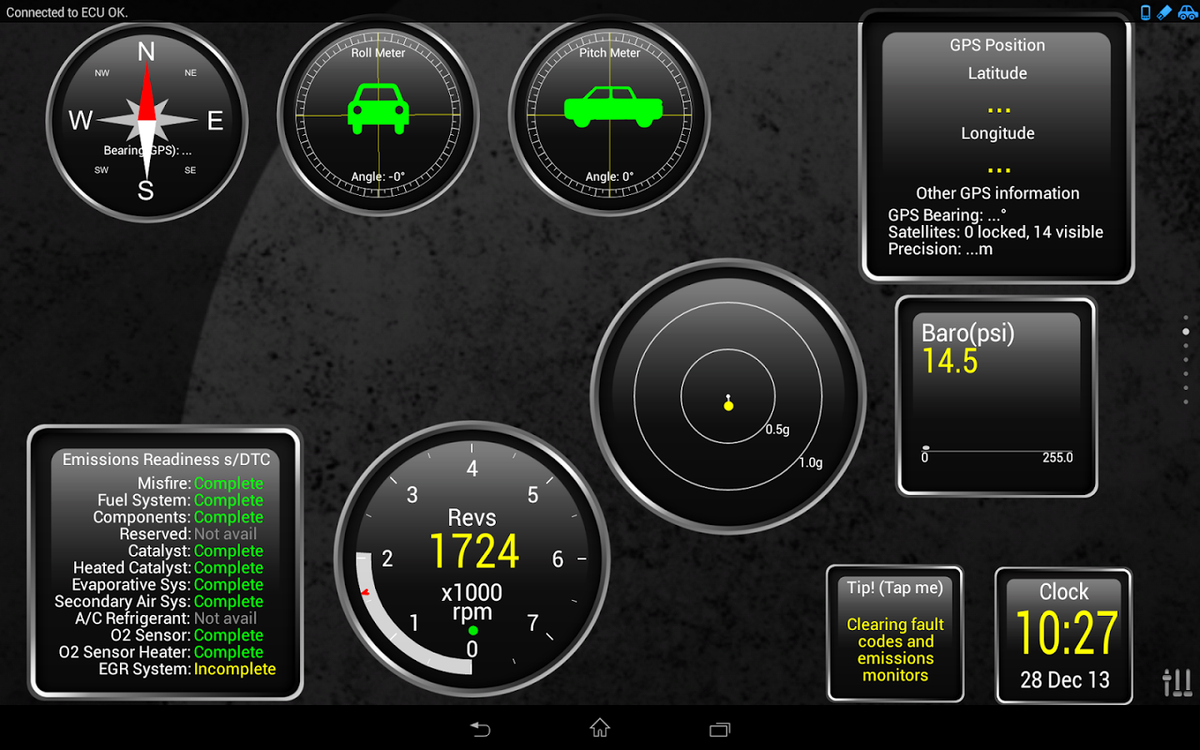
The check engine light comes on and you're left guessing. This OBD2 Bluetooth module takes that guesswork away. Plug it into the OBD-II port, pair it with your Android device via Bluetooth, and you have access to live engine data, system health readings and the ability to read and clear diagnostic trouble codes.
Whether you're chasing a fault before a workshop visit, keeping tabs on your 4x4's vitals on a long trip, or just want better visibility over your vehicle's health, this tool gives you the data you need without opening the bonnet. Supports all standard OBD-II protocols and over 3000 generic code definitions, covering a wide range of makes and models.
Note: compatible with Android devices only. A third-party app is required and available via the Google Play Store. App is not included. Functionality may vary depending on your vehicle's make and model.
What it does.
READ & CLEAR FAULT CODES
Diagnose check engine lights and clear trouble codes directly from your Android device. Covers 3000+ generic OBD-II code definitions.
LIVE SENSOR DATA
Monitor engine RPM, vehicle speed, coolant temperature, throttle position, fuel system status, intake air pressure, O2 sensor voltage, air flow rate, fuel trim and more in real time.
PLUG AND PLAY
No wiring or tools required. Plugs directly into your vehicle's OBD-II port and pairs with your Android phone or tablet via Bluetooth in seconds.
Installation overview.
LOCATE YOUR OBD-II PORT
Find the OBD-II port in your vehicle, typically located under the dashboard on the driver's side.
PLUG IN THE MODULE
Insert the Bluetooth scan gauge module firmly into the OBD-II port.
DOWNLOAD AN APP
Download a compatible third-party OBD2 app from the Google Play Store on your Android device.
PAIR AND GO
Enable Bluetooth on your Android device, pair it with the module, and begin reading live data and fault codes.